






















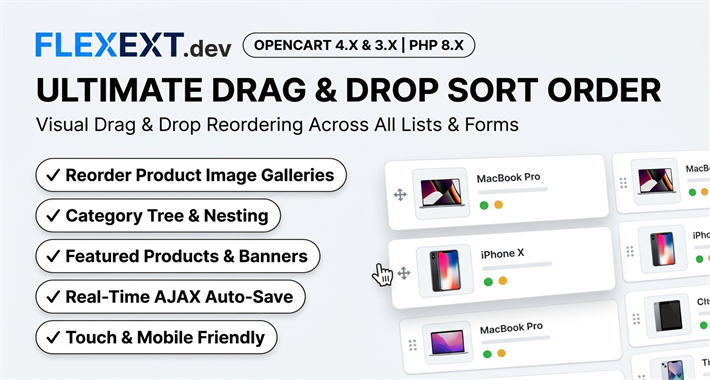
Featured Extension: Explore the official Ultimate Drag & Drop Sort Order Manager module, fully tested for OpenCart 4.x and 3.x.
In standard OpenCart, sorting categories, subcategories, banner slides, and product gallery images requires typing arbitrary numbers (0, 1, 2, 3...) into manual "Sort Order" input boxes. This process is painfully slow, prone to numbering conflicts, and impossible to visualize. Discover how Ultimate Drag & Drop Sort Order transforms store organization into an intuitive, visual drag-and-drop workflow.
1. The Frustration of Manual Numeric Sort Orders
When you want to insert a new subcategory between items currently numbered "2" and "3", you are forced to renumber dozens of subsequent items manually. If two categories share the same sort order, OpenCart falls back to alphabetical sorting, breaking the intended visual hierarchy.
2. Tailoring Visual Sorting Across Your Store
Product Image Galleries
Reorder additional product gallery photos so that key selling angles, lifestyle shots, and dimension graphics appear in the exact sequence customers want to see.
Category Hierarchy & Menus
Drag and drop parent and child categories visually with immediate live tree nesting, ensuring high-priority seasonal categories stay front and center.
3. Comparison: Manual Sorting vs FlexExt Ultimate Drag & Drop
| Management Task | Default OpenCart | FlexExt Ultimate Drag & Drop Sort Order |
|---|---|---|
| Category Reordering | Type numbers into individual forms | Drag and drop nodes in an interactive visual tree |
| Product Gallery Sorting | Type sort order per image row | Drag thumbnail cards directly in the product edit form |
| Auto-Save | Must click master "Save" button | Real-time AJAX auto-save in under 50 milliseconds |
| Mobile / Tablet Support | Awkward input fields | Full touch support for tablets and mobile admin |
4. Best Practices for Store Hierarchy Optimization
- Prioritize High-Margin Categories: Place high-converting and high-margin product groups in the top three positions of your category tree.
- Audit Secondary Product Images: Ensure the first additional photo highlights the most important feature (e.g., fabric texture or ports).
- Maintain Consistent Nesting Depth: Avoid creating category trees deeper than 3 levels to maintain optimal crawl budget for search bots.
Related Technical Guides & OpenCart Architecture



Frequently Asked Questions & Technical Insights
Ultimate Drag & Drop Sort Order Manager
High-performance OpenCart 4 and 3 extension. Lifetime updates & priority technical support.
- Official Ultimate Drag & Drop Sort Order Manager extension for OpenCart 4 & 3
- 100% event-driven architecture with zero core file modifications
- Full commercial license with instant digital delivery and updates
- Extensively tested across all major PHP 8.x versions and modern themes