SAVE 35%
ULTIMATE SEO & TRAFFIC INTELLIGENCE SUITE (3-in-1) SEO Analytics Pro + Product FAQ + Custom Tabs
SAVE 35%
STORE CONVERSION & SALES BOOSTER SUITE (3-in-1) Stripe Gateway + Mega Menu Pro + Hide Quantity & Direct Buy
Ends in: 08h 42m 19s
$119.00 $77.35
Offer Details
$105.00 $68.25
Offer Details
Featured Product FlexExt

Automated Demo Sandbox Reset System

Official Automated Demo Sandbox Reset System | FlexExt.dev

Product Code: FLX-DEMO-RESET • Availability: In Stock

Key Highlights & Features
Premium Quality Guaranteed
Fast & Secure Delivery
100% Encrypted Checkout
24/7 Dedicated Support
$35.00
$25.00
Best Price & Quality Guarantee

Available Options

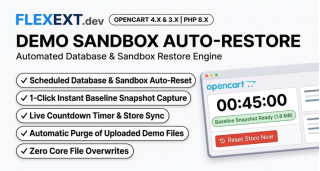
FlexExt Automated Demo Reset & Baseline Restore System is the mission-critical sandbox protection suite for OpenCart module developers, theme authors, and software vendors. Safeguard public demonstration stores against malicious tampering, spam orders, accidental deletion of admin settings, and defaced content by automatically restoring the database and file system to a clean baseline on a scheduled recurring cron schedule or via 1-click manual trigger.

Demo Reset & Restore Showcase Banner

Bulletproof Public Demo Sandboxes with Zero Manual Maintenance

Running a public live demo store with credentials (demo / demo) means visitors inevitably delete categories, alter module credentials, or submit spam orders. FlexExt keeps your demo pristine 24/7 by automatically resetting to a clean snapshot every hour, 6 hours, or daily without downtime.

Scheduled Recurring Cron

Automate resets every 1, 2, 4, 6, 12, or 24 hours via server cron job or internal OpenCart pseudo-cron trigger.

1-Click Baseline Snapshot

Capture your perfect demo state with 1 click in admin to create an encrypted, compressed baseline database archive.

File & Image Protection

Removes uploaded test images, cleans temporary cache directories, and restores catalog demo media files.

Admin Account Lockdown

Prevents public demo users from changing master administrator passwords, email addresses, or locking out other visitors.

Public Reset Countdown

Optional floating countdown banner informing visitors when the next automated demo reset will occur.

Sub-Second Restore Speed

High-speed MySQL transactional restore executes in under 2 seconds with zero storefront downtime.

Technical Specifications
Compatibility4.1.0.4, 4.1.0.3, 4.1.0.2, 4.1.0.1, 4.1.0.0, 4.0.2.3, 4.0.2.2, 4.0.2.1, 4.0.2.0, 4.0.1.1, 4.0.1.0, 4.0.0.0, 3.0.5.1, 3.0.5.0, 3.0.4.1, 3.0.4.0, 3.0.3.9, 3.0.3.8, 3.0.3.7, 3.0.3.6, 3.0.3.5, 3.0.3.3, 3.0.3.2, 3.0.3.1, 3.0.3.0, 3.0.2.0, 3.0.1.3, 3.0.1.2, 3.0.1.1, 3.0.1.0, 3.0.0.0
PHP VersionPHP 8.3, PHP 8.2, PHP 8.1, PHP 7.4

Documentation & Installation Guide

Installation is 100% automated via OpenCart Extension Installer (.ocmod.zip). Zero core files are modified.

  1. Navigate to Extensions > Installer in your OpenCart Admin.
  2. Upload the matching .ocmod.zip package for your OpenCart version.
  3. Go to Extensions > Modifications / Extensions and enable the module.
  4. Enter your commercial license key to activate instant automatic updates.
v1.1.2 Official Release
  • Synchronized countdown timer and snapshot creation timestamp with store local timezone (Europe/Warsaw).
  • Improved client-side countdown timer precision with automatic resynchronization.
v1.1.1 Official Release
  • Fixed AJAX action routes (snapshot_url and reset_now_url) and user token normalization in Twig templates.
  • Enhanced AJAX error handling with detailed server response diagnostics.
v1.1.0 Official Release
  • Ultra-fast native MySQL batch stream dump engine with snapshot generation time under 0.2s.
  • Secure transactional database restoration with utf8mb4 charset support and foreign key bypass during import.
  • Unlocked instant manual baseline snapshot creation in admin panel.
v1.0.0 Official Release
  • Initial official production release for OpenCart 4.x and OpenCart 3.x.
  • Automated recurring demo sandbox database reset with configurable interval timer.
  • Automatic cleanup of newly uploaded user demo files, images, and attachments.

Yes, Automated Demo Reset & Baseline Restore System for OpenCart is officially built with dual-engine architecture natively supporting OpenCart 4 (4.0.0.0 through 4.1.0.0+) and OpenCart 3 (3.0.0.0 through 3.0.3.9+). Separate, optimized packages are provided for each platform.

Absolutely. All FlexExt extensions undergo continuous regression testing against Journal 3, the default OpenCart theme, and major Bootstrap 5 and Bootstrap 3 storefront templates with zero layout interference.

The extension supports PHP 7.4, 8.0, 8.1, 8.2, and 8.3. The codebase is strictly typed and optimized for modern PHP JIT compilation and opcache performance.

Upon purchasing the extension on flexext.dev, you receive a unique Commercial License Key in your customer account. Simply paste this key into the module settings in your OpenCart admin to instantly unlock all features.

Not at all. Performance is our primary benchmark. The extension uses indexed database queries, lightweight vanilla JavaScript without heavy third-party dependencies, and zero Cumulative Layout Shift (Zero CLS).

Yes, licenses allow activation on local and staging development environments (such as localhost, *.test, *.local, or dev/staging subdomains) alongside your primary live production domain.

No. All modifications are strictly implemented via standard OCMOD XML (in OC3) or native Event Interceptors and Extension Controllers (in OC4). Your core OpenCart system files remain 100% untouched.

Yes, 100%. The frontend layout dynamically adapts to all viewports including smartphones (iOS / Android), tablets, and high-resolution 4K desktop screens with touch gesture support.

You can download updated .ocmod.zip packages directly from your flexext.dev customer portal. Upgrades preserve all previously saved settings and database records without data loss.

Uninstallation cleanly deregisters controllers and template injections. Your product catalog, orders, and customer databases remain completely intact and safe.

Yes, full multi-store support is built into the architecture. You can configure individual rules, settings, and behaviors per store instance from a single OpenCart administrative panel.

Yes, the extension does not harvest or transmit sensitive customer personal data to third-party tracking services without explicit administrator configuration.

Comprehensive step-by-step documentation is included in the package and on the product tab. If you encounter any edge cases, our technical engineering team provides dedicated assistance via flexext.dev.

No. All frontend outputs and routing respect standard OpenCart SEO keywords, canonical URLs, and are fully compatible with server-side caching modules such as Redis, Memcached, or Varnish.

We stand behind our software with a 100% functionality guarantee. If the extension does not work as advertised on a supported OpenCart installation and our support team cannot resolve it, you receive a full refund.