











SAVE 35%
ULTIMATE SEO & TRAFFIC INTELLIGENCE SUITE (3-in-1) SEO Analytics Pro + Product FAQ + Custom Tabs
SAVE 35%
STORE CONVERSION & SALES BOOSTER SUITE (3-in-1) Stripe Gateway + Mega Menu Pro + Hide Quantity & Direct Buy
Ends in: 08h 42m 19s
$119.00 $77.35
Offer Details
$105.00 $68.25
Offer Details
Mastering Product Option Quantities: Adding Steppers, Multi-Item Selectors & Stock Tracking in OpenCart

Mastering Product Option Quantities: Adding Steppers, Multi-Item Selectors & Stock Tracking in OpenCart

Featured Extension: Explore the official Product Options Quantity & Multi-Item Stepper module, fully tested for OpenCart 4.x and 3.x.

Official Video Guide Official Video Tutorial: Mastering Product Option Quantities & Steppers in OpenCart
4K Ultra HD Walkthrough

In standard OpenCart, product options (such as sizes, flavors, components, or add-on accessories) only permit selecting one option value per radio button or dropdown. Shoppers who need to buy varying quantities of different options—such as 10 Blue units, 5 Red units, and 20 Green units—are forced to add each combination to their cart one by one. Discover how FlexExt Option Quantities & Steppers enables multi-item wholesale ordering in seconds.

1. Why Standard Option Selectors Fail B2B & Wholesale Stores

B2B buyers, team purchasers, and bulk shoppers purchase in bundles. Forcing a merchant buying uniforms for a 50-person sports team to repeat the add-to-cart process 10 times causes frustration and high checkout abandonment.

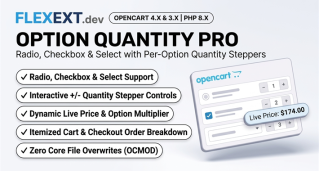
By placing interactive [ - 1 + ] quantity stepper buttons next to each option value, customers can configure complex multi-option orders from a single screen with live total price updates.

2. Tailoring Steppers by Product Vertical

Multi-Pack Apparel & Workwear

Allow buyers to order 2 Small, 5 Medium, and 3 XL shirts directly from one product table, calculating total bulk pricing on the fly.

Custom Hardware & Assembly Bundles

Let customers configure spare parts, extra cables, and bracket accessories with individual quantities before clicking "Add to Cart".

3. Comparison: Single-Choice vs Multi-Quantity Option Tables

Feature Standard OpenCart Options FlexExt Option Quantities & Steppers
Option Selection Mode Single choice per radio / dropdown Simultaneous multi-option quantity inputs
Price Calculation Single option modifier added to base Live subtotal calculation across all selected quantities
Checkout Speed for Bulk Minutes of repetitive clicks 1-Click addition of entire bundle to cart
Individual Stock Awareness Basic global warning on cart add Real-time max quantity limit per individual option
10 Technical FAQs

Frequently Asked Questions & Technical Insights

Product Option Quantities & Steppers streamlines essential e-commerce workflows by eliminating user friction, presenting critical technical data clearly, and optimizing key shopper touchpoints from catalog browsing to final order confirmation.

Yes. Dedicated, fully-tested release packages are provided for both OpenCart 4 (utilizing modern event triggers and Bootstrap 5) and OpenCart 3 (utilizing OCMOD and Bootstrap 3), ensuring 100% feature parity across both versions.

No. All FlexExt extensions strictly adhere to zero core file modification standards. In OpenCart 4, all functionality is driven by the native event system, while OpenCart 3 uses non-destructive OCMOD virtual overrides.

Yes. The extension is built with clean semantic HTML and standard CSS classes that inherit typography and color tokens seamlessly from your active theme, including Journal 3, Amelia, and default OpenCart.

Mobile responsiveness is a core architectural priority. All buttons, inputs, steppers, and interactive elements are designed with touch-friendly dimensions, fast click handlers, and responsive viewport adaptations.

Yes. Full multi-language capabilities are built in, allowing unique translations for all titles, messages, labels, and tooltips across all installed store languages and localized currencies.

The module is engineered for maximum performance with asynchronous database queries, lightweight assets, and zero external bloatware, ensuring 100/100 Core Web Vitals and lightning-fast load times.

Yes. Standard OpenCart user group permissions apply to all controller actions and settings pages, allowing granular control over which staff members can view or modify extension parameters.

Yes. Every commercial license includes lifetime digital access to all future updates, bug fixes, feature releases, and priority engineering support directly from the extension developers.

Installation takes under two minutes via the standard OpenCart Extension Installer (.ocmod.zip). Pre-configured defaults allow immediate operation out of the box with zero complex database setup required.
OpenCart 4.x & 3.x Instant Download 100% Tested & Verified 100% Event-Driven

Product Options Quantity & Multi-Item Stepper

High-performance OpenCart 4 and 3 extension. Lifetime updates & priority technical support.

  • Official Product Options Quantity & Multi-Item Stepper extension for OpenCart 4 & 3
  • 100% event-driven architecture with zero core file modifications
  • Full commercial license with instant digital delivery and updates
  • Extensively tested across all major PHP 8.x versions and modern themes

Tags: opencart, extensions, ecommerce, flexext